Requesting a signature sounds simple. In practice, it is one of the most common sources of delay in contract and document workflows. The signatory loses the email. The document is unclear about what needs to be signed. The deadline is not communicated. The wrong person receives the request. And the legal or commercial team chases, follows up, resends, and waits.
Getting a signature request right the first time is not complicated, but it does require a few deliberate choices about how the request is framed, who it goes to, and what the signatory needs to do. Here are five tips that consistently reduce the time between sending a signature request and receiving a signed document.
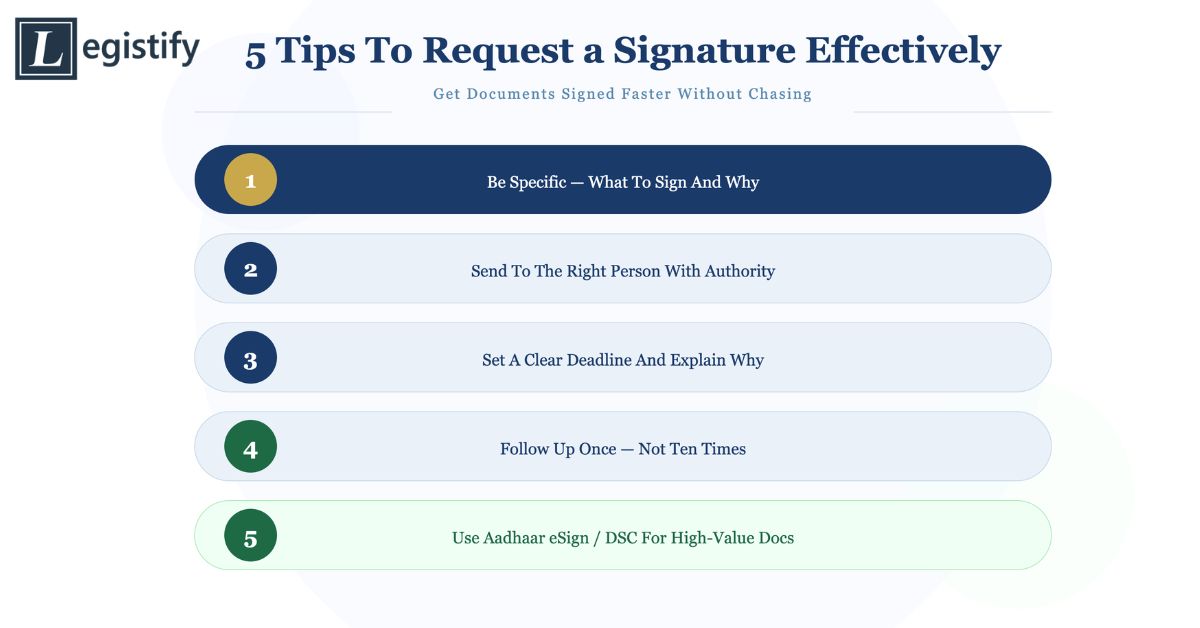
1. Be Specific About What Needs to Be Signed and Why
The most common reason signature requests are delayed is that the signatory does not know exactly what they are being asked to sign or why it matters. A vague request, “Please sign the attached document,” gives the signatory nothing to act on quickly. They have to open the document, read it, understand its significance, and decide whether they need to consult someone else before signing.
A specific request removes this friction. “Please sign the NDA attached to this email. It covers confidentiality obligations for our upcoming product discussion with ABC Limited. The counterparty needs the signed copy by Friday.” This tells the signatory what the document is, why it exists, who the other party is, and when it needs to be done.
For longer or more complex documents, point the signatory to the specific sections that require their signature rather than asking them to find the signature lines themselves. A cover note that says “Please sign on Page 12 (Signatory A) and initial the amendment on Page 5” is significantly more actionable than a general request.
If you are using an e-signature platform, configure the signature fields in advance so the signatory is directed exactly where to sign rather than working through the full document.
2. Send the Request to the Right Person With the Right Authority
Signature requests that go to the wrong person are almost always delayed. The recipient needs to redirect the request to the correct signatory, which introduces lag and sometimes means the request gets lost in the transfer.
Before sending any signature request, confirm that the person you are sending it to has the authority to sign the document in question. For commercial contracts, this means verifying that the signatory’s authority is consistent with the company’s board resolutions, signing authorities, or delegation of authority matrix. Sending a high-value contract to a mid-level manager who does not have signing authority for that amount creates a delay while they escalate internally.
For documents that require multiple signatories, confirm the signing sequence before sending. Some agreements require a specific order: the buyer signs first, then the seller; the employee signs, then the employer. Routing documents in the wrong sequence wastes time and sometimes creates executed documents that are procedurally deficient.
In organisations with structured approval workflows, the signature request should go through those workflows rather than bypassing them. A request that jumps the approval chain, even with good intentions, often gets rejected or requires a restart.
3. Set a Clear Deadline and Explain Why It Matters
Without a deadline, a signature request sits in the signatory’s inbox until they have time to deal with it, which may be much later than you need. A clear deadline changes the signatory’s relationship with the request: it becomes a time-sensitive action item rather than something to be done eventually.
The deadline should be specific, not relative. “By end of day on 15 July” is clearer than “as soon as possible” or “by the end of the week.” And the deadline should be accompanied by a brief explanation of why it matters: what happens if the document is not signed by that date, or what the business consequence of delay is.
Where a statutory or contractual deadline exists, state it plainly. “Our contract requires that this agreement be executed no later than 15 July or the transaction cannot proceed” is more motivating than a general request for prompt action.
Build in a buffer between your actual requirement and the deadline you communicate. If you need the signed document by Friday to meet a Monday obligation, request it by Wednesday. This gives you time to follow up if the initial request is not actioned before your real deadline arrives.
4. Follow Up Promptly Without Being Intrusive
A single follow-up, sent two to three days after the initial request if no response has been received, is almost always appropriate and effective. Signatories are busy, signature requests get buried in inboxes, and a brief, courteous reminder is usually welcomed rather than resented.
The follow-up should be short: reference the original request, confirm what needs to be signed, and restate the deadline. It should not repeat the full detail of the initial request. “Following up on the NDA I sent on Monday, 12 July. Please sign by Wednesday, 15 July if you have not already done so. Happy to answer any questions.” This is all that is needed.
Resist the temptation to follow up too frequently. Multiple follow-ups within a short period create the impression of pressure rather than professionalism, and they are more likely to generate resentment than a signed document. One follow-up at the right interval, with a second if the first is not acknowledged close to the deadline, is the standard that works.
If you are using an e-signature platform, many platforms support automated reminders that send follow-up notifications at defined intervals. These reminders are perceived as less intrusive than personal follow-up emails and reduce the burden on the person managing the signature request.
For one-off signature requests between parties who have an established relationship, an email with an attached document is often adequate. For high-volume requests, time-sensitive documents, or requests involving multiple signatories, a purpose-built signature request tool produces significantly better outcomes.
E-signature platforms allow you to send a document directly to one or more signatories, set signature fields in advance, track whether the document has been opened and signed, send automated reminders, and receive a completed, timestamped record of the executed document. The signatory does not need to download, print, scan, or return anything. The friction is minimal.
For enterprise legal teams managing hundreds of contract executions per month, the efficiency difference between email-based signature requests and e-signature platform-based requests is substantial. Cycle times reduce significantly. Documents do not get lost. The audit trail is complete.
In India, Aadhaar eSign allows signatories to sign documents using their Aadhaar number and OTP or biometric authentication, producing a legally valid electronic signature under the IT Act, 2000. This method is widely supported for consumer-facing agreements, financial services contracts, and commercial agreements where Aadhaar-based identity verification is appropriate. For corporate signatories, Digital Signature Certificates (DSCs) provide the most legally robust form of electronic signature for high-value agreements and regulatory filings.
Legistify eSign (legistify.com/sign-doc) is a free, no sign-up tool that supports all three signature modes — Digital (OTP), Aadhaar eSign, and DSC Token — for PDFs up to 10MB with up to two signatories. Documents can be sent, tracked, and executed in under two minutes, with a court-admissible audit trail and full compliance with the IT Act, 2000 and BSA 2023.
Here is how to send a signature request using Legistify eSign:
Step 1 — Upload your PDF. Go to legistify.com/sign-doc and upload the document you need signed. No account or credit card is required.
Step 2 — Add signatories. Enter the name and email of up to two signatories. Choose the signature type for each: Digital (OTP-verified), Aadhaar eSign (UIDAI-backed, highest legal enforceability), or DSC Token (Class 3, for statutory filings).
Step 3 — Place signature fields. Drag and drop the signature field onto the exact location where each signatory needs to sign.
Step 4 — Send and track. Click Send. Each signatory receives a secure signing link by email. You get a unique tracking code to monitor signing status in real time. Once complete, download the executed document with a full court-admissible audit trail.
A Note on Follow-Through After the Signature
Once a document is signed, the signature request workflow is not complete until the executed copy reaches everyone who needs it. The signed document should be stored in the document repository, confirmation should be sent to all signatories, and any obligations triggered by the signature (such as obligation tracking, payment timelines, or regulatory filings) should be initiated.
A signature request that results in a signed document that nobody files properly is a workflow that produces incomplete records. The final step of the signature request process is ensuring that the executed document is stored, distributed, and acted upon.
Conclusion
Requesting a signature effectively is a combination of clear communication, correct routing, specific deadlines, well-timed follow-up, and the right tools. None of these steps is individually complex. Together, they significantly reduce the delay between sending a signature request and receiving a signed document, and they ensure that the executed document enters the organisation’s records correctly.
For enterprise legal teams managing large volumes of contract execution, these practices compound: across hundreds of agreements per month, the cumulative time saving from effective signature request management is material.